Fedora 12 Beta

0 comments
downloadicon
The time has come for Fedora fans to test the Beta release of the upcoming Fedora 12 (Constantine) Linux distribution, announced by the Fedora Project developers. This release is powered by Linux kernel 2.6.31.4, and it includes the KDE 4.3.2 and GNOME 2.28.0 desktop environments. Moblin support was also added in this release, as well as better power management, audio, webcam and video codec support. GNOME Shell is also available for testing, in the default software repository, and it will offer a preview of how GNOME 3 will look like. However, checking the feature list for Fedora 12, it appears that the developers completed all of them.


Highlights of Fedora 12 Beta:

· Linux Kernel 2.6.31.4;
· Dracut, the new booting system;
· Plymouth graphical boot splash;
· KDE 4.3.2;
· GNOME 2.28.0;
· New artwork;
· Empathy Instant Messenger;
· Moblin support;
· Better webcam support;
· Spanning desktop support;
· Improved HD video codecs;
· Network Manager mobile broadband for GSM networks;
· EXT4 is the default filesystem;
· x86 optimized for the Intel Atom processors (compiled for i686);
· RPM XZ compression;
· Guest virtual machines for KVM;
· Automatic bug reporting tool (ABRT);
· New NetworkManager with better IPv6 and Mobile Broadband support;
· Improved power management support;
· Support for Intel BIOS-RAID;
· Better support for Intel hardware;
· Clustered Samba support;
· Improved PulseAudio;
· Improved PackageKit;
· Improved KVM virtualization;
· Fedora Studio;
· BSoD (Bluetooth Service On Demand);
· NFS4;
· NetBeans 6.7;
· Ogg Theora 1.1.0;
· PolicyKit 1.0;
· Improved SystemTap.

There are other many other minor features in this Beta release, so make sure you check out the official release notes for Fedora 12. The release cycle will continue with a Release Candidate version, scheduled for the 4th of November, and the final release on November 17th, 2009

Softpediafree, Softpedia free, Free software programs for Windows, Unix/Linux, Mac, Mobile Phones, Games and Drivers. A library free software programs for Windows, Unix/Linux, Mac, Mobile Phones, Games and Drivers

Mobile GMaps

1 comments
downloadicon
MGMaps - U.S. Map Screenshot Mobile GMaps is a FREE application that displays maps from Google Maps, Yahoo! Maps, Windows Live Local (MSN Virtual Earth), Ask.com, Open Street Map and other sources on Java J2ME-enabled mobile phones, PDAs and other devices. MGMaps can connect to a GPS receiver over bluetooth or use internal GPS features on some phones in order to automatically display the map for your current position. You can pre-download maps and store them on your memory card in order to use them on the go without accessing the internet.


Mobile GMaps is distributed under the Attribution - NonCommercial - NoDerivs Creative Commons license. You may download, use and distribute the application free of charge only for personal, non-commercial purposes.
Prerequisites

Before you download and install Mobile GMaps, make sure you have support for:

* J2ME (Java) on your phone or PDA — MGMaps runs on devices that support CLDC 1.0 and MIDP 1.0 or later. This includes the vast majority of mobile phones sold in the last three years. It also includes all Windows-Mobile/PocketPC/Palm PDAs, but some of them do not come with Java preinstalled. See the Getting Started section to learn how to download and install Java on these devices.
* Internet or WAP access on your cell phone — MGMaps downloads all map and satellite tiles in real-time over the web. The application is completely free but you may be charged by your network operator for internet access. For optimum performance, a broadband connection like EDGE, 3G, HSDPA or WiFi is recommended.

Download and Install

Installation instructions:
* Open the WAP site http://wap.mgmaps.com on your mobile phone, then select the download link. This is the recommended method of installing Mobile GMaps.

* If the above does not work for some reason (e.g. you are using a PDA or your phone does not support WAP 2.0), you will have to take the longer path. You'll have to download the JAD and JAR file(s) on your computer, upload them to your phone (using bluetooth, infrared, or serial/USB cable), then install the application by opening the JAD or the JAR file on the phone. Hint: you can open the WAP site in your PC browser to download the JAD/JAR files for specific versions.

If the installation is successful, you should find MGMaps in the list of installed Java applications for most phones, in the main menu or the "My Own" menu for Symbian phones, or in the "Java Games" menu for some other phones. You should read the Getting Started section before starting to use the program.
Demo

You can run MGMaps on your PC using mpowerplayer, as long as you have Java 2 standard edition installed. Click here to demo Mobile GMaps v1.39

Softpediafree, Softpedia free, Free software programs for Windows, Unix/Linux, Mac, Mobile Phones, Games and Drivers. A library free software programs for Windows, Unix/Linux, Mac, Mobile Phones, Games and Drivers

NOKIA N86 --- 8MP ----Released

1 comments

Nokia recently announced the N86 8MP, the first Nokia phone to break the 8 megapixel camera mark. It features Carl Zeiss optics with triband 3G HSDPA/HSUPA, a 2.6-inch OLED display running at 240 x 320 QVGA resolution, and 8GB of onboard memory augmented with microSD cards. Nokia N86 runs S60 3rd Edition, FP2, has WiFi b/g, A-GPS, a digital compass and accelerometer. Nokia also preload the N86 8MP with their Ovi online services suite, including Nokia Maps 3.0 with voice-guided driving directions.

General
• 2G Network --- GSM 850 / 900 / 1800 / 1900
• 3G Network --- HSDPA 900 / 2100
• HSDPA --- 850 / 1900 / 2100 - American version

Size
• Dimensions --- 103.4 x 51.4 x 16.5 mm, 69 cc
• Weight --- 149 g
Display
• Type --- AMOLED, 16M colors
• Size ---240 x 320 pixels, 2.6 inches
• Accelerometer sensor for auto-rotate
• Scratch-resistant surface

Sound
• Alert types --- Vibration; Downloadable polyphonic, MP3 ringtones
• Speakerphone --- Yes, with stereo speakers
• 3.5 mm audio jack
• Dedicated music/gallery keys

Memory
• Phonebook Practically unlimited entries and fields, Photocall
• Call records Detailed, max 30 days
• Internal --- 8 GB storage, 128 MB RAM
• Card slot --- microSD (TransFlash), up to 16GB, buy memory
Data
• GPRS --- Class 32
• HSCSD --- Yes
• EDGE --- Class 32, 296 / 177.6 kbits
• 3G --- HSDPA 3.6 Mbps
• WLAN --- Wi-Fi 802.11 b/g, UPnP technology
• Bluetooth --- Yes, v2.0 with A2DP
• Infrared port --- No
• USB --- Yes, v2.0 microUSB

Camera
• Primary --- 8 MP, 3264x2448 pixels, wide 28mm Carl Zeiss lens, autofocus, dual LED flash
• Features --- Variable apperture, geotagging, ISO 800
• Video --- Yes, VGA@30fps
• Secondary --- VGA videocall camera
Battery
• Standard --- battery, Li-Ion 1200 mAh (BL-5K)
• Stand-by --- Up to 312 h (2G) / 264 h (3G)
• Talk time --- Up to 6 h 18 min (2G) / 3 h 54 min (3G)
• Music play --- Up to 25 h

Features
• OS Symbian --- OS v9.3, S60 rel. 3.2
• CPU --- ARM 11 434 MHz processor
• Messaging --- SMS, MMS, Email
• Browser --- WAP 2.0/xHTML, HTML
• Radio --- Stereo FM radio with RDS; FM transmitter
• Games --- Yes, N-gage + downloadable
• Colors --- Indigo Black, White
• GPS --- Yes, with A-GPS support; Ovi Maps 3.0
• Java --- Yes, MIDP 2.1

Application
• Dual slide design
• Digital compass
• WMV/RV/MP4/3GP video player
• MP3/WMA/WAV/RA/AAC/M4A music player
• Document viewer (Word, Excel, PowerPoint, PDF)
• Voice memo
• Kickstand
• Flash Lite 3.1
• TV-out

Softpediafree, Free software programs for Windows, Unix/Linux, Mac, Mobile Phones, Games and Drivers

Mac OS X 10.6 "Snow Leopard"

0 comments
Mac OS X is the world’s most advanced operating system. Built on a rock-solid UNIX foundation and designed to be simple and intuitive, it’s what makes the Mac innovative, highly secure, compatible, and easy to use. Quite simply, there is nothing else like it.

Power of UNIX. Simplicity of the Mac.
Mac OS X is both easy to use and incredibly powerful. Everything — from the desktop you see when you start up your Mac to the applications you use every day — is designed with simplicity and elegance in mind.

Perfect integration of hardware and software.
Since the software on every Mac is created by the same company that makes the Mac itself, you get an integrated system in which everything works together perfectly. The advanced technologies in the operating system take full advantage of the 64-bit, multicore processors and GPUs to deliver the greatest possible performance

Elegant interface and stunning graphics.
The most striking feature of a Mac is its elegant user interface, made possible by graphics technologies that are built to leverage the advanced graphics processor in your Mac. These technologies provide the power for things like multiway chatting, real-time reflections, and smooth animations.

Highly secure by design.
Mac OS X doesn’t get PC viruses. And with virtually no effort on your part, Mac OS X protects itself from other malicious applications that help keep you safe from online threats.

Built for compatibility.
The versatility and power of Mac OS X make it compatible in almost any environment, including Windows networks. Mac OS X Snow Leopard is the only operating system with built-in support for the latest version of Microsoft Exchange Server, so you can use your Mac at home and at work.

Innovation for everyone.

Mac OS X comes standard with a wide range of assistive technologies that help people with disabilities experience what the Mac has to offer — including many features you won’t find in other operating systems at any price. Mac OS X also offers out-of-the-box support for over 40 braille displays, including Bluetooth displays, and many other accessibility features, such as dynamic full-screen magnification, playback of closed captions, and a scalable screen..


Applications

* Address Book * Automator * Calculator * Chess * Dashboard * Dictionary * DVD Player * Font Book * Front Row * iCal * iChat * Image Capture * iSync (supported devices) * iTunes * Mail * Photo Booth * Preview * QuickTime Player * Safari * Stickies * System Preferences * TextEdit * Time Machine

Utilities

* Activity Monitor * AirPort Utility * Audio MIDI Setup * Bluetooth File Exchange * Boot Camp Assistant * ColorSync Utility * Console * DigitalColor Meter * Disk Utility * Exposé * Grab * Grapher * Java Preferences * Keychain Access * Migration Assistant * Network Utility * Podcast Capture * RAID Utility * Script Editor * Script Utility * Setup Assistant * Spaces * System Profiler * Terminal * VoiceOver Utility * X11

Key Technologies
* AppleScript * Aqua * Bonjour * CDSA security architecture * Cocoa, Carbon, and Java * ColorSync * Core Animation * Core Audio * Core Image * Core Video * Grand Central Dispatch * H.264 * Inkwell * OpenCL * OpenGL * PDF * Quartz Extreme * QuickTime X * 64-bit computing * Sync * Unicode 5.1 * Universal Access * UNIX * USB and FireWire peripheral support * Xgrid

Development
* Xcode 3 IDE with Interface Builder 3 * Instruments * Dashcode * AppleScript Studio * Automator 2 * Shark * GCC compiler and toolset (original project by FSF.org) * DTrace (original project by Sun) * Complete Java JDK, including javac, javadoc, ANT, and Maven tools * Apache web server * AppleScript * Ruby and the Ruby on Rails frameworks * Python * Perl * PHP * SQLite

Languages

* English * Japanese * French * German * Spanish * Italian * Dutch * Swedish * Danish * Norwegian * Finnish * Traditional Chinese * Simplified Chinese * Korean * Brazilian Portuguese * Portuguese (Portugal) * Russian * Polish

Softpediafree, Softpedia free, Free software programs for Windows, Unix/Linux, Mac, Mobile Phones, Games and Drivers. A library free software programs for Windows, Unix/Linux, Mac, Mobile Phones, Games and Drivers

EASEUS Partition Master Professional 4.0.1

1 comments
downloadicon
A full-featured hard disk partition management tool

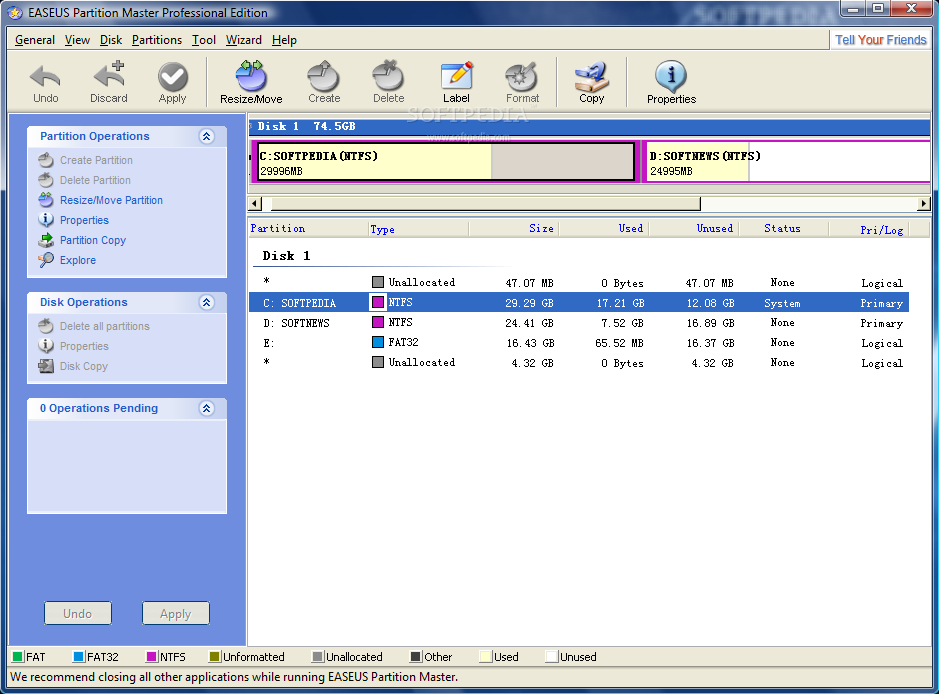
EASEUS Partition Master is a comprehensive partition software, which not only provides a comfortable user-interface to simplify your tasks but also enables you to configure and manage partitions of hard disk(s).

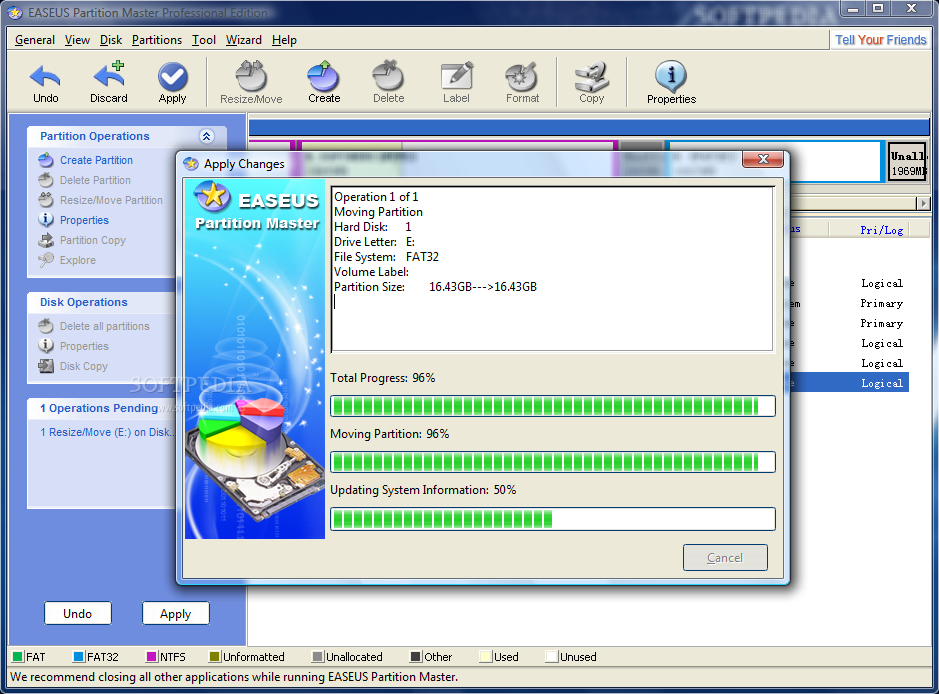
With the help of EASEUS Partition Master you can create and delete partitions on your hard disk quickly and easily. The most attractive feature is that it can resize/move your partitions by using the free spaces.

With EASEUS Partition Master you'll be able to easily manage the space on your hard drive(s).

Here are some key features of "EASEUS Partition Master Professional":

• Support hardware RAID.
• Resize and move partitions without losing data.
• Create, delete and format partitions with simple step.
• Label partitions - assigned to a partition for easier recognition.
• View Disk/Partition property of each partition.
• Hide and unhide partitions - protect important data from unauthorized or casual access.
• Set an active partition - specify one partition to be the boot partition.
• Preview the effects of partitioning a hard drive before implementing anything.
• Change cluster size automatically and manually.
• Support hard disks from 2 GB to 1 TB.
• User-friendly interface.

What's New in This Release:

• Copy dynamic volume
• Extend NTFS system partition without reboot


Softpediafree, Free software programs for Windows, Unix/Linux, Mac, Mobile Phones, Games and Drivers

Avast! Home Edition 4.8.1335

0 comments

downloadicon
avast! 4 Home Edition is a free complete ICSA certified antivirus software for home noncommercial use.

avast! obtained VB100% awards in 2002/3 Virus Bulletin comparative reviews under Windows XP Pro and under Windows 2000 Advanced Server.

avast! Home Edition includes the following components:
■ On Demand Scanner - with Skinnable Simple Interface - just select what do you want to scan in which way and press the Play button.
■ On Access Scanner - resident scanning of all files being opened, read and written and behavior blocker monitoring dangerous actions of viruses.
■ E-mail scanner easily integrates with most mail clients and it checks both incoming and outgoing mails, it provides heuristic analysis of mail content to protect against new Worms.
■ Boot Time Scanner - scans disks in the same way and in the same time as Windows CHKDSK does (on NT/2000/XP only).
■ Explorer Scanner - right click on the object allows you to scan it.
■ Screen Saver Scanner - integrates with your Screen Saver to scan PC during your coffee breaks.
Virus Chest - safety isolated folder to store infected, suspicious and even some system files - to restore them.

Protect your system and valuable data against computer viruses with Avast! Home Edition.

Our true incremental updates are based on iAVS technology and they are available for virus definition file update and for program upgrade.
You can download and install updates by simple clicking on the iAVS icon, it can be checked and done automatically when you are On-line.

The update files of size under 100 KB are available at least twice a week and within couple of hours in the case of emergency of new virus. They are automatically downloaded, installed and loaded to avast! without restart or logoff.

What's New in This Release:

· improvements in some unpackers (WinExec, Installer, ZIP)
· improved memory scan, especially under 64-bit operating systems
· fixed a possible deadlock condition when copying system files from some removable media
· fixed a possible problem with access rights when deleting infected files on reboot
· Web Shield: minor stability fixes
· Internet Mail: smtp.gmail.com and smtp.live.com now ignored on port 25 (as these are SSL only)
· improved healing of some infected files
· various fixes and improvements in the scanning engine
· Web Shield now scans pages compressed with the "deflate" algorithm
· performance optimization of Standard Shield under Windows Vista
· improvements in the automatic sample submission system
· improvements in the URL blocker

Requirements:

· For a computer with Windows 95/98/Me: PC 486, 32 MB RAM, 50 MB of free hard disk space
· For a computer with Windows NT 4.0: PC 486, 32 MB RAM, 50 MB of free hard disk space, Service Pack 3 or higher installed
· For a computer with Windows 2000/XP: PC Pentium, 64 MB RAM (128 MB recommended), 50 MB of free hard disk space
· For a computer with Windows Vista: PC Pentium 4, 512 MB RAM, 50 MB of free hard disk space
· The program itself requires 20 MB, the rest is reserved for the virus recovery database file and its index. [VRDB, also known as the "integrity database" from the previous version]
· A functional MS Internet Explorer 4 or higher is required for the program to work.