SongBird 1.2.0

0 comments
downloadicon
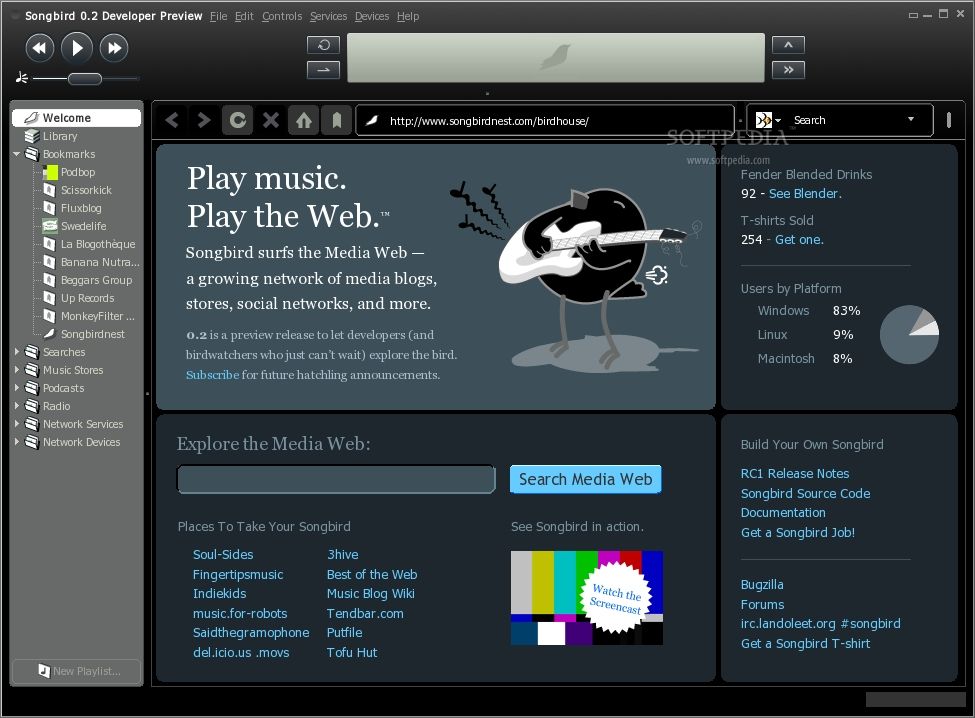
Songbird project is a desktop Web player, a digital jukebox and Web browser mash-up.

Songbird project is a desktop Web player, a digital jukebox and Web browser mash-up. Like Winamp, it supports extensions and skins feathers.Like Firefox, it is built from Mozilla, cross-platform and open source.

Here are some key features of "SongBird":

Play Anything:MP3, AAC, OGG, FLAC, WMA, and more. Can you teach Songbird to sing?

Pick Feathers:Choose from the two included themes: Rubberducky or Dove. You can even make one yourself.

Control the Flow:Play, Pause, Previous, Next, Volume, Mute, Seek, Three Repeat Modes, and Shuffle.

Multi-Task:Quickly switch between tasks using the buttons to the right of the dashboard display.

Organize Your Library: Filter your collection by Genre, Artist, Album, and Song or Search-As-You-Type.

Scan Your Computer for Music:Songbird will find your music and add it to your collection for you.

Super Slim Mini-Mode: Use the mini-mode for basic controls while keeping Songbird out of the way.

Multi-Language Support: Songbird comes in 39 languages. Be a localizer and see Songbird in your language!

Build Custom Mixes: Drag-and-drop songs from the Library or another playlist to your create your own custom mixes.

Make Smart Mixes: Criteria-based playlists that are always up-to-date with your current collection.

Dynamic Mixes: Get mixes from the Internet and stay up-to-date with the latest updates, downloads, and casts.

Play In Place: Songbird plays MP3s without leaving the page.

Play the Web: Play web pages as playlists and view any web page as a playlist.

Set Music Watch Folders: Tell Songbird to watch a folder for new music and it will automatically add new tracks to your collection


What's New in This Release: [ read full changelog ]

On Demand Fetching of Album Artwork
:
• Songbird can now fetch album artwork from the web at your command. Simply select or right-click a track and choose "Get Album Artwork". You can also select your preferred source of artwork. By default, Songbird will retrieve album art from Last.fm but you can install from other sources such as amazon.com via an add-on.

MTP Device Support
:
• We fixed many bugs affecting MTP devices on Windows. We've also added the ability to synch authorized Windows Media DRM'ed content to your MTP device. To see if your MTP device is supported, or to report your findings, visit our MTP Device Support page.

Watch Folders:
• You can choose to watch a folder hierarchy for changes and the content will auto-magically be imported in your library. If a file is removed from the watched folder, the corresponding track will be deleted from your Library.

Better Sorting:
• Library sorting supports unicode collation and better handling of leading definite and indefinite articles such as "The" and "a".

Replay Gain Support (Normalization):
• If a track's metadata contains replay gain (including iTunes-specific) information, Songbird will adjust the playback gain appropriately.

Reduced Installer Packages:
• We've reduced the installer package size on Mac and Linux by about 45% on each of those platforms.

Improved Memory Usage/Performance:
• As part of our project to bring down memory usage in Songbird, we've re-tuned the database to be less greedy with your system's memory. On some memory starved systems, this should actually increase performance, but most users shouldn't notice any difference in searching, sorting, scrolling, filtering, or smart playlists. Users with very large libraries (>100,000 tracks) will see the biggest memory use improvements. If you do find things are more sluggish than you remember, please see Tuning Songbird Memory Usage and try adjusting the page cache size upwards. If you find any problems in these areas, please file a Bugzilla issue against Songbird.

7digital MP3 Store Add-on (Beta):
• We've partnered with 7digital to bring you the highest quality MP3s (320kbps). You can easily search, purchase, organize and get recommendations directly into Songbird. Just click on the 7digital Music Store node in your Songbird service pane. NOTE: The UK store is fully stocked, but the US and other European stores are still continuing to populate a complete catalog of music. Please file any bugs, issues or suggestions for the 7digital MP3 store specifically in our Bugzilla database.

NAV (Norton Antivirus) 2010 Beta

0 comments
downloadicon
Winning protection against viruses, spyware, and malicious software.

Features:
• Antivirus
• Antispyware
• Intrusion prevention
• Email protection
• Browser protection
• Rapid pulse updates every 5 to 15 minutes
• SONAR 2 technology
• Norton Insight
• Application vulnerability protection

Norton AntiVirus 2010 will be the fastest and lightest malware scanner Symantec has ever delivered. The Norton AntiVirus application scans faster and uses less memory than any other antivirus product on the market. Unlike free solutions from Microsoft, Norton AntiVirus includes intrusion detection to detect malicious code hidden in web sites before it can strike.

Key Benefits

• Stops viruses, worms, spyware, bots, and more—Keeps your system protected against all types of malicious threats.
• Norton Insight—Delivers innovative intelligence-driven technology for faster, fewer, shorter scans.
• Rapid pulse updates every 5 to 15 minutes—provides up-to-the-minute protection.
• Prevents virus-infected emails and instant messages from spreading—Feel secure while you keep in touch.
• Blocks browser exploits and protects against infected Web sites

Up-to-the-minute Protection:

• Delivers up-to-the-minute protection with rapid pulse updates every 5 to 15 minutes.
• IMPROVED! Provides multilayered security through the Norton Protection System.
• Prevents bots from taking control of your PC.
• Detects and automatically removes malicious threats.
• IMPROVED! Defends against Web-based attacks.
• Automatically detects and removes spyware, viruses, Trojans, bots and Internet worms.
• Recovery tool boots and repairs badly infected PCs. Delivers our most complete, deep cleaning scan possible.
• Norton Ongoing Protection provides continuous protection updates and new product features as they become available throughout your product subscription period, helping to keep your computer protected against the latest Internet threats and risks.
• Norton Automatic Renewal Service helps to ensure that you’re protected by automatically renewing your product subscription before it expires.

Control without disruptions:

• Automatically schedules scans and updates to occur while PC is idle.
• Review the security status of every process on your PC.
• Silent mode helps ensures movies and games are never interrupted.
• Maps your wireless home network.


Kaspersky Internet Security 2010 9.0.0.463 Beta

0 comments
downloadicon
Has everything you need for a safe and secure Internet experience

The Kaspersky Internet Security 2009 application was designed to be a all-in-one security solution that offers a worry-free computing environment for you and your family. Kaspersky Internet Security 2009 has everything you need for a safe and secure Internet experience.

Here are some key features of "Kaspersky Internet Security":

Essential Protection:
· Protects from viruses, Trojans and worms
· Blocks spyware and adware
· Scans files in real time (on access) and on demand
· Scans email messages (regardless of email client)
· Scans Internet traffic (regardless of browser)
· Protects instant messengers (ICQ, MSN)
· Provides proactive protection from unknown threats
· Scans Java and Visual Basic scripts


Extended Protection:
· Two-way personal firewall
· Safe Wi-Fi and VPN connections
· Intrusion prevention system
· Intelligent application management and control
· automatically configured application rules
· security rating is assigned to unknown applications
· access to the user’s resources and data is restricted for unknown applications

Preventive Protection:
· Scans operating system and installed applications for vulnerabilities
· Analyzes and closes Internet Explorer vulnerabilities
· Disables links to malware sites
· Detects viruses based on the packers used to compress code
· Global threat monitoring (Kaspersky Security Network)

Advanced Protection & Recovery:
· The program can be installed on infected computers
· Self-protection from being disabled or stopped
· Restores correct system settings after removing malicious software
· Tools for creating a rescue disk

Data & Identity Theft Protection:
· Disables links to fake (phishing) websites
· Blocks all types of keyloggers
· Virtual keyboard is provided for safely entering logins and passwords
· Prevents the theft of data exchanged via secure connections (HTTPS / SSL)
· Blocks unauthorized dial-up connections
· Cleans up any traces of user activity (deletes temporary files, cookies etc.)

Content Filtering:
· Parental control
· Improved antispam protection (plugins for Microsoft Outlook, Microsoft Outlook Express, The Bat!, Thunderbird)
· Blocks banners on web pages

Usability:
· Automatic configuration during installation
· Wizards for common tasks
· Visual reports with charts and diagrams
· Alerts provide all the information necessary for informed user decisions
· Automatic or interactive mode
· Round-the-clock technical support
· Automatic database updates

Championship Manager 2010™

0 comments
Championship Manager 2010™ to launch this September

downloadicon
Beautiful Game Studios are proud to announce the next iteration of the Championship Manager series is set to kick off in September 2009, including a brand new feature never before seen in a football management game. - CM Season Live™. Take total control with Championship Manager 2010, the leading name in football management simulations is back with a brand new look and a host of new features to bring the most loved sport in the world straight to your PC.

The fully animated, 3D match engine (featuring 500 fully motion captured animations per player) propels you right into the heart of the action on match day, taking your management experience one step further. The only match engine specifically designed and created for a football management game allows you to watch the team in action as they put your carefully crafted tactics into action, view individual performances and be on hand to make changes when things go wrong.

It’s not just on the pitch Championship Manager has changed, 2010 brings players a host of never before seen features including; CM Season Live™, Scouting Networks, Drill Training, Set-piece creator and video capture. For the first time ever start the game at key moments during the new season and face real world management challenges. With a brand new interface and backed by a huge database with all the latest data, begin the journey to manage your team to success and bathe in glory.

Championship Manager 2009'smatch engine has undergone a radical overhaul with the prize a bespoke fully-animated match engine. Created entirely in-house at CM headquarters and designed specifically to bring the management experience to life, the manager now has the perfect viewpoint from which to observe their Matchday instructions taking place on the pitch.

Each player has over 500 fully motion captured animations, and with seven different camera angels from which to view the action, the new CM 3D match experience provides the user with more direct match information than ever before.

News & Media


A whole range of messaging in the game enables you to have far greater access to information and news from within the game's world of football. Broadcasting real media references, the latest CM news system delivers in a wide variety of ways. The user gets all the information and all the news that's relevant to their game.

Media Suite


Complimenting the in-game news system, CM now contains a host of media tools to allow the user to make the most of their in-game messages and media. In other words, you only get the info you want.

Dynamic Display Window

A dynamically updated display window brings a real world likeness to the user. Managers will be able to look out on the latest league tables, fixtures, top goal scorers and more from their in-game football world. Coverage from every part of the globe will appear throughout the game on every screen. It's the complete picture.

Manager Mail & Reports

By filtering mail messages managers get only the news they want. Plus, managers now also have the opportunity to select from a number of regular in-game reports that matter to their situation, whether it be other match reports or stats on players and other teams.

An exclusive feature to the CM series, ProZone continues to evolve to enable users to access highly detailed, post-match analysis on their players. With full stats on their own team and the opposition, the manager has the complete picture of personal and team performances so he can make the big decisions. Providing data on every pass, run, shot and more, ProZone is the analysis tool, putting CM in the real football world. Professional managers use ProZone on a daily basis. It doesn't get any more real than that.

Sceenshoots


Sceenshoots1, Sceenshoots2, Sceenshoots3


Firefox 3.5 RC3

0 comments
downloadicon
The browser provides virus, popup and spyware protection in a simple, easy to use tabbed interface. The Firefox project (formerly Firebird, which was formerly Phoenix) is a redesign of Mozilla's browser component, written using the XUL user interface language and designed to be cross-platform. Firefox is a small, fast and very easy to use browser that offers many advantages over other web browsers, such as the ability to block pop-up windows and the tabbed browsing.

Here are some key features of "Firefox":
• Comprehensive popup controls to keep unwanted advertising off your desktop;
• A tab browsing mode that lets you open several pages in a single window, allowing you to load links in the background without leaving the page you're on;
• Integrated search (powered by Google);
• Industry leading accessibility with Find As You Type - find links and page text by simply typing;
• Simplified privacy controls that let you cover your tracks more effectively;
• A streamlined browser window that lets you see more of the page than any other browser while at the same time being more configurable;
• A large variety of free downloadable extensions and themes that add specific functionality and visual changes to the browser.

What's New in This Release: [ read full changelog ]
• The 800,000+ users of Firefox 3.5 Beta 4 will be receiving an update to a “Firefox 3.5 Preview” release in order to assist us with further testing and feedback. This update contains many fixes for stability bugs, correctness fixes for our JavaScript engine, and improvements to our built in support for open Ogg based video and audio playback. While this release has not yet completed the testing required to be declared a release candidate, it is considered stable for daily browsing use and we appreciate your assistance in helping us test and evaluate this preview release.
• If you’re a Firefox 3.5 Beta user you should be receiving this update automatically within the next 24 hours. To get the update immediately, select “Check for Updates…” in the “Help” menu.
• If you’re not yet a Firefox 3.5 Beta user, we recommend that you wait for the upcoming Firefox 3.5 Release Candidate, which should be in the next 1-2 weeks. If you’d like to become a beta tester for Firefox.

Meet Safari 4, the world’s most innovative browser

0 comments
downloadicon
It renders web pages at lightning speed. It works on the iPhone, iPod touch, Mac and PC. It shows you your favorite sites at a glance. And it’s so smart; it even checks your spelling and grammar.

Elegant browser

Safari is designed to emphasize the browsing, not the browser. The browser frame is a single pixel wide. You see a scroll bar only when needed. By default, there’s no status bar. Instead, a progress gear turns as your page loads. And if you so choose, you can hide almost the entire interface, removing virtually every distraction from the browser window. A great browser should get out of your way and let you simply enjoy the web. Safari does just that. And it does it regardless of platform. The first browser to deliver the “real” internet to a mobile device, Safari renders pages on iPhone and iPod touch just as you see them on your computer. Of course, no matter how you access it, Safari is always blazing fast and easy-to-use.

Innovation

Everyone has their favorite web sites. With Top Sites, Safari keeps a running tally of the websites you visit and automatically creates a graphically rich page that displays up to 24 thumbnails of your favorites. That makes it easy to spot the site you want to visit, and to open it with a click.

The world’s fastest browser, Safari has speed to burn. In fact, every Safari update is tested to make certain it continues to deliver the fastest browsing experience on any platform.

Safari
is leading the way to a standards-based Internet. Safari was the first browser to support CSS 3 Animations, which bring a new level of interactivity to the web, and CSS Effects, which let developers add polish to websites by stylizing images and photos with eye-catching gradients, precise masks, and stunning reflections.

The browser that has your back

Yes, the web can be a scary place. But when you use Safari, you can surf worry free. To keep your browsing your business, Safari offers Private Browsing. Simply turn it on, and Safari stops recording the sites you visit and the software or docs you download. It also stops storing your Google searches, cookies, and the data in online forms you fill out.